第1章 基本的な使い方
各部の名称とはたらき
デスクトップタイプ
TS5210DNシリーズ、TS5210DFシリーズ
<正面>
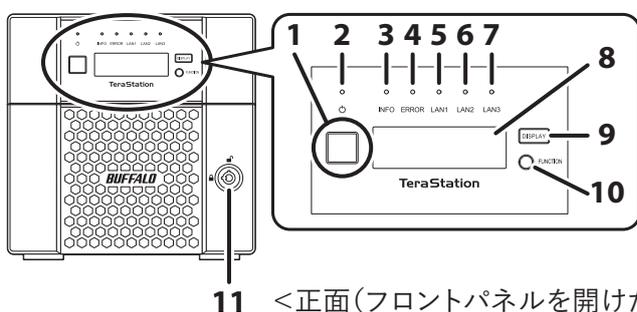
Front view of the TS5210DN/DF series TeraStation. The main unit is on the left with a front panel latch (11). On the right is a detailed view of the front panel. It features seven LED indicators (1-7) for INFO, ERROR, LAN1, LAN2, LAN3, LAN4, and LAN5. Below the LEDs is a square display window (8) showing 'TeraStation'. To the right of the window are two buttons: 'DISPLAY' (9) and 'FUNCTION' (10).
<背面>
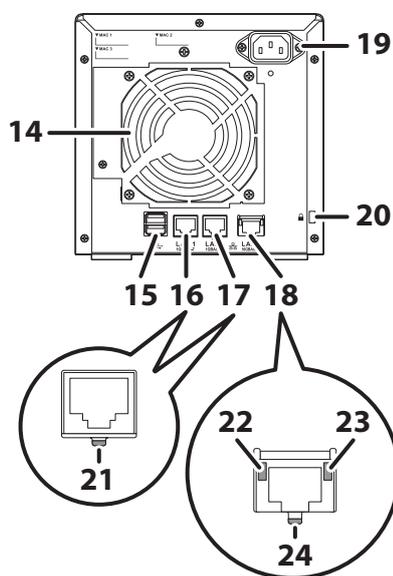
Rear view of the TS5210DN/DF series TeraStation. The main unit is on the left. On the right is a detailed view of the rear panel. It features a large cooling fan (14) in the center. Above the fan is a power switch (19). Below the fan are four RJ45 LAN ports (15, 16, 17, 18) labeled LAN1, LAN2, LAN3, and LAN4. At the bottom are two power input sockets (20). Two circular callouts provide close-up views of the LAN ports: the left one shows the port itself (21), and the right one shows a cable inserted into the port, with the latch (22), the cable (23), and the port (24) labeled.
11 <正面(フロントパネルを開けた状態)>
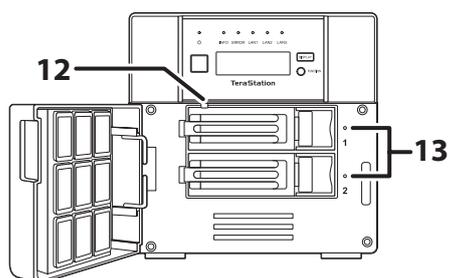
Front view of the unit with the front panel open. The open panel is on the left, showing its internal structure. The main unit on the right shows the internal drive bays (12) and a handle for the drive tray (13).