セキュリティ設定
ログイン方法の設定やパスワードの制限など、ログインのセキュリティ設定について説明します。
ログイン方法を設定する
ユーザーのログイン方法は次の3通りです。運用に適したログイン方法を設定します。
- ● ユーザー名で選ぶ
- ● 組織とユーザー名で選ぶ
- ● ログイン名を入力する

Warning icon: exclamation mark inside a triangle.
- ● ログイン方法を「ログイン名を入力する」に設定すると、ログイン名が設定されていないユーザーはログインできなくなります。ユーザーのログイン名を設定してから、ログイン方法を変更してください。
- ● ログイン方法には、リストからユーザーを選択する方法と、ユーザー名を入力してログインする方法があります。インターネット環境で利用する場合、リストから選択できる方法にしていると、ユーザー名や組織情報が閲覧される恐れがあります。
1. システム設定画面で、
 ログイン方法 をクリックします。
2. ログイン方法を選択し、 変更する をクリックします。
-
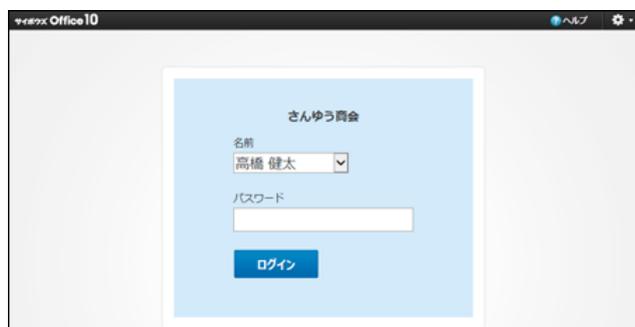
● ユーザー名で選ぶ
ドロップダウンリストからユーザー名を選択し、パスワードを入力します。
-
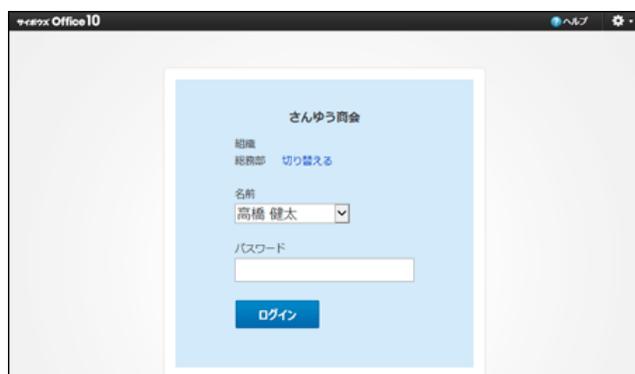
● 組織名とユーザー名で選ぶ
組織名とユーザー名を選択し、パスワードを入力します。
-
● ログイン名を入力する
ログイン名とパスワードを入力してログインします。