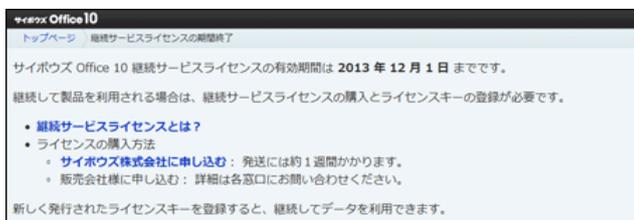
Screenshot of the 'サイボウズ Office 10' (CyberTrust Office 10) '継続サービスライセンスの期間終了' (Continuation Service License Expiration) page. It states that the license is valid until 2013/12/1. It lists links for 'What is a continuation service license?' and 'How to purchase a license' (via CyberTrust Co., Ltd. or a distributor).
■ 継続サービスライセンスの有効期間が終了した場合
継続サービスライセンスの有効期間の終了後、有効なライセンスが必要な機能やアプリケーションを使おうとすると、継続サービスライセンスの期間終了画面が表示されます。
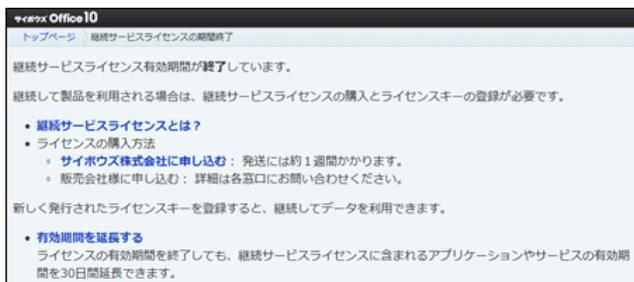
Screenshot of the 'サイボウズ Office 10' continuation service license expiration page. It indicates that the license has expired and provides links for purchasing a license or extending the validity period by 30 days.
メッセージ部分の 有効期間を延長する をクリックすると、有効期間の延長画面が表示されます。
延長する をクリックすると、継続サービスライセンスを1度だけ無償で延長できます。この延長期間に、必要なライセンスを準備してください。
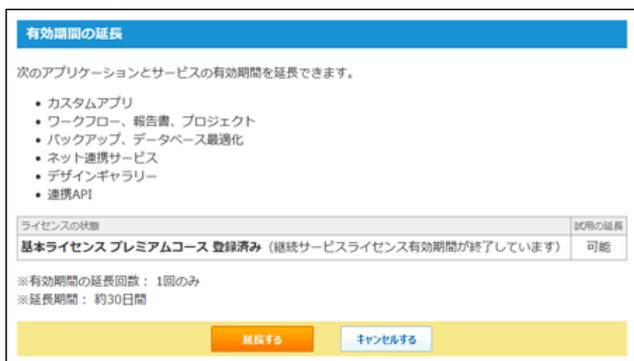
Screenshot of the '有効期間の延長' (Extend Validity Period) page. It lists applications and services that can be extended: Custom Apps, Workflow, Reports, Project, Backup, Database Optimization, Network Sharing Service, Design Gallery, and Connected API. A table shows the license status for 'Basic License Premium Course Registration Complete' as 'Possible' for trial extension. It notes that the extension can only be done once for approximately 30 days. There are 'Extend' and 'Cancel' buttons.
一度、有効期間を延長すると、 有効期間を延長する は表示されません。継続して利用する場合は、ライセンスを発注してください。
ライセンスを確認する
ライセンスの登録状況を確認します。
-
1. システム設定画面で、
Image: key icon
ライセンスキーの登録 をクリックします。
システム設定画面にアクセスする - 2. 画面下で、 ライセンスキーの登録履歴 をクリックします。