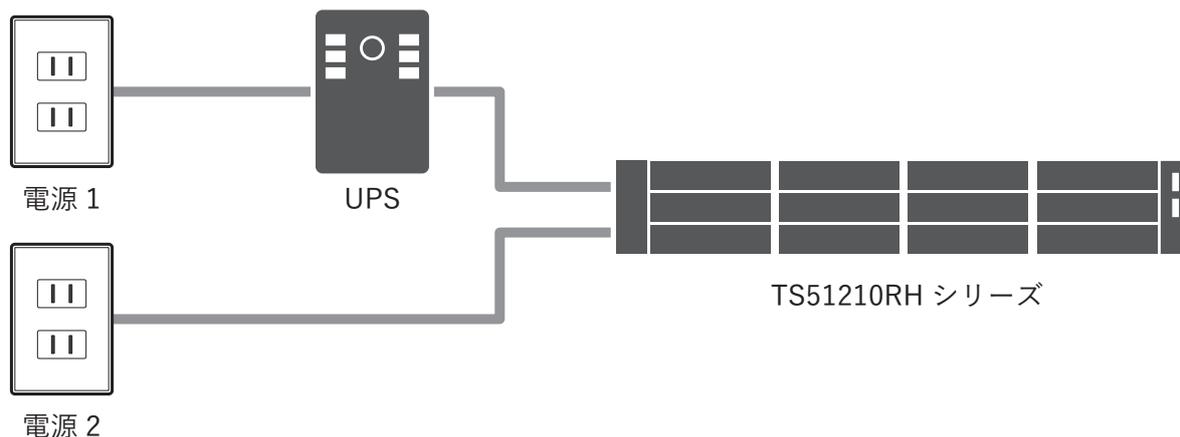
The diagram illustrates a power configuration where two power sources, labeled '電源1' and '電源2', are connected to a single Uninterruptible Power Supply (UPS). The UPS is then connected to a TS51210RH series device, represented by a horizontal bar with four slots and a power indicator on the right.
メモ: この構成例の場合、「AC電源供給復旧後にTeraStationを起動する」を「はい」にしても正しく動作しません。
UPSを2つ使用する場合
本製品の電源ケーブルを2つのUPSに接続します。
電源は異なる電源系統に接続して、冗長性を高めてください。
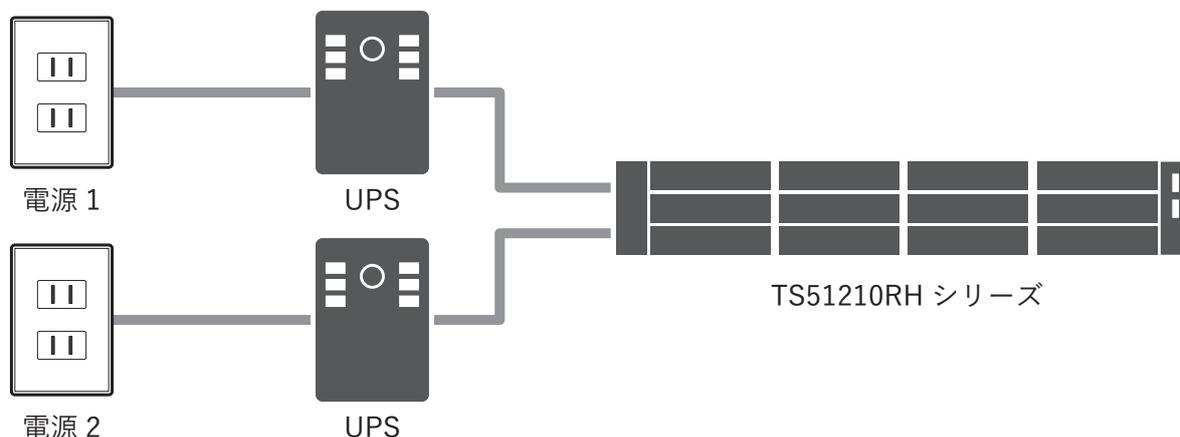
The diagram illustrates a power configuration using two UPS units. '電源1' is connected to the first UPS, and '電源2' is connected to the second UPS. Both UPS units are connected to a single TS51210RH series device.
メモ: UPS接続方式の設定を2つとも「UPS専用ポート接続」にすることはできません。
- 1 構成例のように、UPSの電源ケーブルをコンセントに接続します。
- 2 構成例のように、本製品の電源ケーブルをUPSに接続します。
- 3 構成例のように、UPSと本製品をUPS接続ケーブルで接続します。
- 4 先にUPSの電源をONにしたあと、続いて本製品の電源をONにします。
- 5 設定画面で「管理」をクリックします。

-
6 「電源管理」の横にある設定アイコン(
 )をクリックします。

The screenshot shows the '電源管理' (Power Management) section. On the left, there is a power plug icon and the text '電源管理'. On the right, there is a gear icon and the text '連動していません' (Not linked).