防塵フィルターのお手入れ
前面カバーがついた製品をお使いの場合、前面カバーに取り付けられている防塵フィルターのホコリを取り除くときは、以下の手順を行ってください。
1 付属の鍵で前面カバーを開きます。
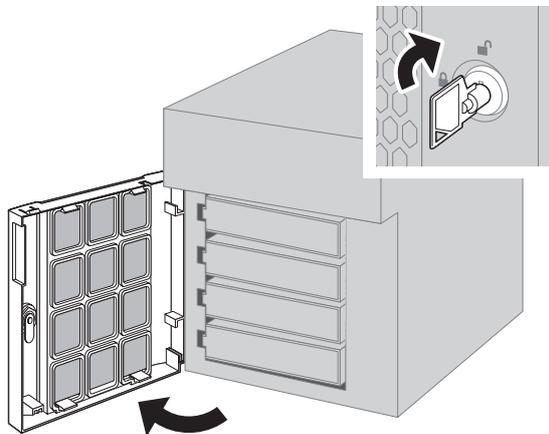
Diagram illustrating the first step: opening the front cover. A key is inserted into a lock on the right side of the front cover, and the cover is swung open to the left. An inset shows a close-up of the key turning in the lock. A curved arrow indicates the direction of the cover's movement.
2 前面カバー裏面のツメを押さえながら前面カバーを取り外します。
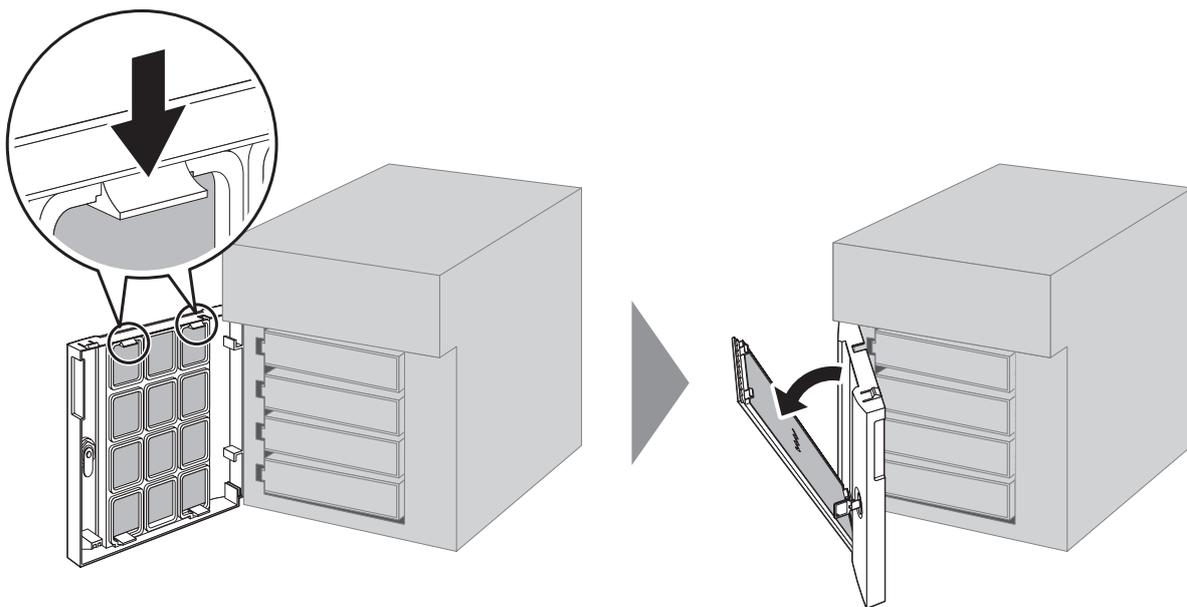
Diagram illustrating the second step: removing the front cover. A circular inset shows a close-up of a finger pressing down on a tab on the top edge of the cover. The main diagram shows the cover being pulled away from the unit. A large arrow points to the right, showing the cover being held away from the unit, revealing the internal components.