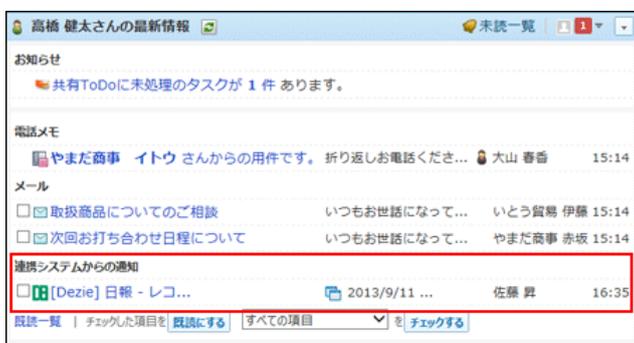
Screenshot of the 'High Bridge Kenji-san's Latest Information' window. It shows a notification section with a message about a shared To-Do task. Below that is a 'Phone Memo' section with a message from 'Yamada Business' to 'Ito-san'. The 'Mail' section contains three items: 'About the products you purchased', 'About the next meeting schedule', and 'Notification from the linked system' (Dezie Daily - Re...). The third item is highlighted with a red box.
閲覧済みの通知は、
 連携システムからの通知
で確認できます。
連携システムからの通知
で確認できます。
受信した通知は5日間保存されます。5日を超えると、1000件を超えた通知から古い順に削除されます。

Warning icon: a yellow triangle with an exclamation mark.
-
● 連携システムからの通知は、メール機能を利用します。
連携システムからの通知を設定する前に、次の準備が完了していることを確認してください。-
▪
 メール
が使用できる状態である。
メール
が使用できる状態である。
- ▪ 通知を受信するユーザーのメールアドレスが登録済である。
-
▪
- ● 通知メールのサイズが、サイボウズ Office側またはメールサーバー側の、メールサイズの制限値を超えていると、通知メールを受信できません。
- ● メールをメールサーバーに残す設定にしても、一度受信した通知メールは再度受信できません。
- ● 受信済の通知メールの総サイズは、ユーザーのメールの総サイズの制限を受けません。
■ 連携システムからの通知が無効の場合
連携システムからの通知が無効の場合、連携先からの通知メールは、メールとして処理されます。
受信した通知は、ユーザーの
 メール
で確認できます。
メール
で確認できます。
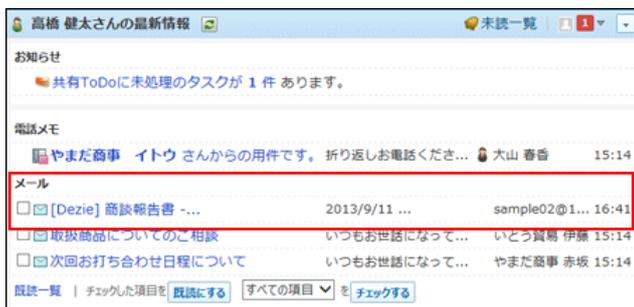
Screenshot of the 'High Bridge Kenji-san's Latest Information' window. The 'Mail' section is highlighted with a red box and contains three items: 'Dezie Business Report', 'About the products you purchased', and 'About the next meeting schedule'. The first item, 'Dezie Business Report', is highlighted with a red box.
メールとして処理する
システム管理者側とユーザー側で、連携システムからの通知を無効にします。
■ システム管理者側の設定
-
1.
連携先の製品で、メール通知を設定します。
詳細は、お使いの製品のマニュアルを参照してください。
連携先がサイボウズ製品である場合は、次のページに参照するマニュアルを案内しています。
 対応製品
対応製品
-
2. システム設定画面で、
 他システムとの連携
をクリックします。
他システムとの連携
をクリックします。
 システム設定画面にアクセスする
-
3.
 使用停止
をクリックします。
使用停止
をクリックします。
- 4. 「連携システムからの通知を使用しない」を選択し、 設定する をクリックします。