連携システムからの通知
連携システムからの通知を設定します。
サイボウズ Officeと連携するシステムの種類によって、設定方法が異なります。
連携システムからの通知とは?
連携システムからの通知は、サイボウズ Officeと連携するシステムからの通知メールを、サイボウズ Office上で通知として扱う機能です。
通知メールを、メールとして処理するか、通知として処理するかは、送信された通知メールのヘッダーに、特殊なヘッダーが含まれるかどうかによって区別されます。
■ 処理のイメージ
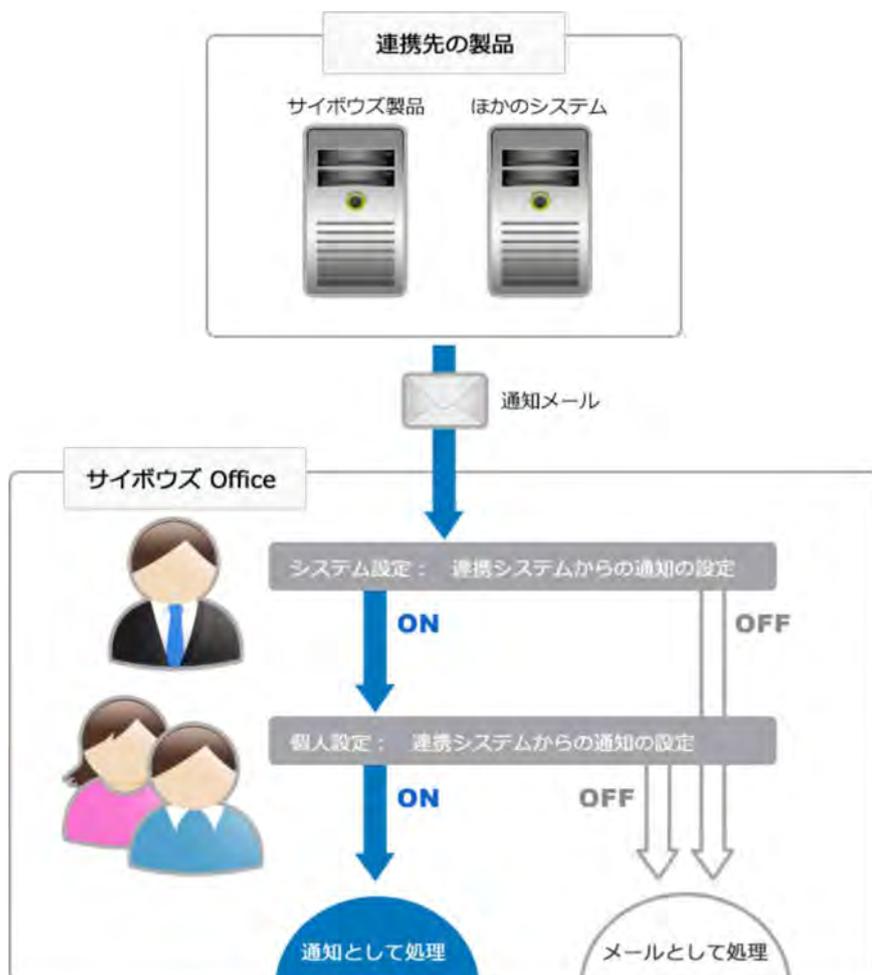
The diagram illustrates the flow of notifications from external systems to Cybozu Office. At the top, a box labeled '連携先の製品' (Connected Product) contains two server icons: 'サイボウズ製品' (Cybozu Product) and 'ほかのシステム' (Other System). A blue arrow labeled '通知メール' (Notification Email) points from this box down to a larger box labeled 'サイボウズ Office'. Inside the Cybozu Office box, there are two user icons. A blue arrow points from the notification email to a grey bar labeled 'システム設定: 連携システムからの通知の設定' (System Setting: Notification Setting from Connected System). From this bar, a blue arrow labeled 'ON' points down to another grey bar labeled '個人設定: 連携システムからの通知の設定' (Personal Setting: Notification Setting from Connected System). From this second bar, a blue arrow labeled 'ON' points down to a blue circle labeled '通知として処理' (Process as Notification). There are also 'OFF' labels with grey arrows pointing down to a grey circle labeled 'メールとして処理' (Process as Email).
■ 連携システムからの通知が有効の場合
連携システムからの通知が有効の場合、連携先からの通知メールは、連携システムからの通知として処理されます。
受信した通知は、ユーザーのトップページの「最新情報」パーツに表示されます。
各通知には、連携先のシステムの種類に合わせたアイコンが表示されるため、どのシステムからの通知であるかを判断しやすくなります。